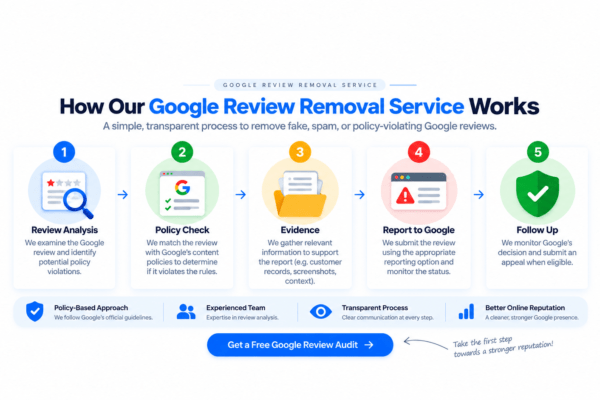
Flagging an unfair review on Google usually takes anywhere from 3 to 14 business days. Automated algorithms and human support staff need time to check the policy rules. If standard flags fail, expert escalations can resolve complex cases within weeks.

Key Takeaways
- Most reported reviews get processed by support staff within 3 to 7 business days.
- Google only deletes posts that break platform safety rules, not ordinary customer service complaints.
- Professional teams provide risk-free options to clean up damaged profiles when standard tools get rejected.
A sudden 1-star rating can ruin your entire morning. When an unfair rating lands on your business profile, your first thought is getting rid of it fast. You click report, pick a reason, and wait.
Then days pass without any update from support. You check your profile every few hours. You watch potential clients walk away because of a score that does not represent your real work. You start wondering, “How do I remove a Google review without getting lost in endless support tickets?” Knowing how long this process takes can help you plan your next steps with confidence.
How Long Does Google Review Removal Take?
Simple flags take between 3 and 7 business days. Complex cases that need manual support or legal reviews can take up to 14 days or longer.
Google handles millions of flagged posts every single day. Simple violations like obvious spam, foul language, or hate speech get cleared fast by algorithms. But tricky cases like fake customer stories, local conflicts, or slander need human eyes.
| Method | Average Timeframe | Best Used For |
| Standard Flag via Business Profile | 3 – 7 business days | Clear policy breaks like explicit spam or bad language |
| Google Support Escalation | 5 – 14 business days | Unresolved reports with solid proof attached |
| Legal Removal Demands | 14 – 30 business days | Serious defamation, privacy breaches, or trademark issues |
| Professional Removal Service | 3 – 10 business days | Persistent, fake, or stubborn rating problems |
Table 1: Overview of Google review removal timelines by escalation method
If nothing changes after 7 business days, Google likely rejected your request without sending an email. Your report might also be stuck in a long backlog queue.
What Happens After You Report a Negative Google Review?
When you submit a report, your file enters a quiet screening system. Google does not inform the reviewer that you flagged their comment. They also do not give you a tracking link or real-time status update.
1. Automated Screening
The moment you hit submit, Google algorithms read the text. The software checks for bad language, known spam IP addresses, and strange posting habits. If the system catches clear bot activity, the post vanishes in hours.
2. Human Policy Review
If automated filters pass the text, your request goes to a real person. A support specialist checks the comment against public content rules.
It helps to know what these workers look for. They do not care who is right or wrong in a customer argument. They do not care if a client was mean or if you offered a refund. They only care if the post breaks explicit platform guidelines. Knowing how to delete Google reviews means focusing purely on platform rules instead of personal feelings.
3. The Final Verdict
Google picks one of three paths:
- Content Removed: The post disappears from public view, and your average score updates instantly.
- Flag Rejected: The post stays active because Google treats it as a normal opinion.
- Request Pending: The file stays unread in a long queue. This often happens during major system updates.
How Do I Remove a Google Review? Standard Escalation Steps
Many business owners ask a simple question: how do I remove a Google review when a fake score attacks their income? While you cannot delete someone else’s post directly, you can push Google support to act by following these exact steps:
Step 1: Locate the Post
Open Google Maps or your Business Profile manager. Find the exact rating. Look at the author’s name and check their past profile activity. Suspicious accounts often drop 1-star ratings on random local shops.
Step 2: Submit a Policy Flag
Click the three dots next to the post. Pick the report option. Select the category that fits best, like spam, conflict of interest, or off-topic rants. Pick carefully. Picking the wrong category leads to quick automated rejections.
Step 3: Open the Review Management Tool
Log in to Google’s official Review Management Tool. This dashboard shows all your recent reports. It lets you track open cases and file appeals for rejected flags.
Step 4: Request a One-Time Appeal
If your first report fails, submit a formal appeal through the dashboard. Attach clear proof. Send missing customer receipts, staff shift logs, or proof of a fake account attack.
Why Google Rejects Removal Flags (And What to Do Next)
Understanding how to delete Google reviews requires learning why standard flags fail so often. Google values user posts above almost everything else. They rarely delete a negative Google review just because a business owner disagrees with the story.
Common Reasons for Rejection:
- No Policy Violations: Complaints about high prices or slow service do not break rules, even if the reviewer lies.
- He Said, She Said Arguments: Google will not sit in the middle of a customer dispute.
- Vague Claims: Reporting a post as fake without showing a clear context gives support workers no reason to act.
If standard flags fail, sending the exact same report again will not work. You need a sharper strategy built around official platform policies.
Why Repeated Flagging Backfires
When a negative Google review hurts your local reputation, waiting for support creates panic. Many business owners log into their accounts every day and report the exact same comment over and over. They assume that multiple flags will force human moderators to look at the file faster.
In reality, sending repeated reports often hurts your chances. Google treats mass flagging from the same business account as system abuse. The platform’s automated filters may mark your account activity as spam. When that happens, your future reports may get ignored or pushed to the bottom of the moderation queue.
If you are wondering how to remove a Google review after your first report gets ignored, patience is key. Send one clear report through your Business Profile dashboard. If that fails, move straight to official appeals rather than hitting the report button again. Learning how to delete Google reviews safely means using structured, official channels instead of spamming support tools.
Professional bad review removal strategies rely on single, high-impact policy appeals. Flooding support forms only creates noise and delays your final verdict.
What to Do While Waiting for Google’s Decision
Sitting and waiting for support to answer can feel painful. But you do not have to stay idle while Google checks your request. Taking smart steps early protects your business while your report sits in the queue.
First, write a calm public response. Never argue with a negative Google review publicly. Keep your answer polite, short, and professional. State clearly that you have no record of their service visit, but invite them to call your office directly. Potential clients read these replies. A polished answer builds trust even while the bad rating stays visible.
Second, gather hard evidence immediately. Take clear screenshots of your internal booking systems, customer lists, and staff logs. Note down exact dates and times. If you need to hire a bad review removal service later, having clean records makes building a winning appeal much faster.
Signs Google Will Not Remove the Review
Many frustrated owners ask: How do I remove a Google review when support completely ignores my tickets? Knowing when Google has quietly closed your file saves you from wasting weeks.
If 10 business days pass without a status change in your dashboard, automated filters likely rejected your request. Another clear sign is receiving an automated email stating the post does not violate community guidelines.
Google relies on rigid algorithms. The platform will not act if a reviewer leaves vague complaints about prices or rude staff. Learning how to delete Google reviews means recognizing when DIY flags reach their limit so that you can switch to expert strategies.
How Remove Review Speeds Up Bad Review Removal
Getting stuck behind automated help forms is frustrating. Unfair scores cost you sales every day they stay online. That is where specialized bad review removal services can help you win.
At Remove Review, we cut through standard support delays. We use deep policy knowledge and legal frameworks to challenge bad ratings successfully.
- Pay Only on Success: You only pay when the damaging post disappears from your profile permanently.
- Policy Appeals: We draft custom arguments targeting hidden policy breaks that normal flags miss completely.
- Score Recovery: Clearing out fake posts fixes your average star rating and brings back real customer trust fast.
Our professional bad review removal process gives business owners a clean slate without wasting months in support ticket queues.
Take Back Control of Your Business Reputation
Waiting weeks for Google support to review a bad rating can hurt your cash flow. Simple flags might take a few days, but fake scores can sit on your page forever without expert help.
Do not let unfair ratings damage your local standing. Reach out to Remove Review today to clear away unfair feedback using our risk-free, pay-per-removal service!
Frequently Asked Questions (FAQs)
Does Google Notify The Author When Their Review Gets Removed?
No. Google does not alert reviewers when their posts get deleted for breaking rules. The poster only notices if they view their public profile directly.
Can I Remove A Negative Google Review That Consists Only Of Star Ratings Without Text?
Yes. Star-only posts lack text, so removal relies on showing suspicious account patterns. Evidence includes bot networks, rapid rating spikes, or major geographic mismatches.
What Happens To Existing Reviews If I Change My Business Name Or Location?
Your existing ratings stay attached to your account. Google links review history to your core business identity, not just a name change or street move.
If A Reviewer Deletes Their Own Google Account, Does The Review Disappear?
Yes. When a user deletes their personal Google account, all their public contributions disappear permanently, including past ratings and photos.
Can Google Restore A Review After It Has Been Deleted?
It is very rare. Google only restores a post if an author successfully appeals a mistaken automated removal. Posts deleted through legal or policy cases stay gone.