Negative reviews can affect your reputation, your Google Business Profile, and the way potential customers see your company. Many business owners search for how to delete Google reviews after receiving a fake, unfair, or harmful review.
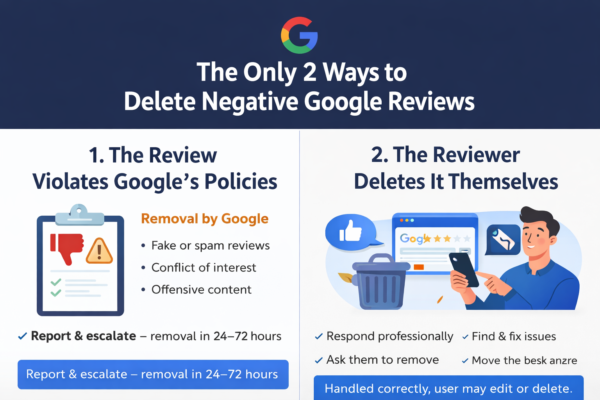
The important thing to understand is this: businesses cannot directly delete Google reviews from customers. Google only removes reviews that violate its policies. Reviews are not removed simply because they are negative or because the business disagrees with them. Google says reported reviews are eligible for removal only when they violate Google’s content policies.
Can You Delete Google Reviews Yourself?
If you are the business owner, you cannot log in to your Google Business Profile and delete a customer review yourself. You can reply to the review, report it, and request removal, but Google makes the final decision.
So, when people ask how to delete Google reviews, the real answer is:
You can delete your own Google review if you wrote it, but you cannot directly delete a review written by someone else. For customer reviews, the correct process is to report the review to Google if it violates policy. Google’s own Maps Help explains that users can edit or delete their own reviews, while inappropriate reviews can be reported.
When Can a Google Review Be Removed?
A Google review may be removed if it includes content that violates Google’s prohibited and restricted content rules. This can include fake reviews, misleading content, offensive language, personal information, spam, harassment, or content that is not based on a real experience.
Google’s policies prohibit many types of harmful content on Maps, including obscene content, sexually explicit content, misleading content, and other restricted categories.
A review may be eligible for removal if it is:
- Fake or not based on a real customer experience
- Written by a competitor
- Posted to attack or damage the business
- Containing hate speech, threats, or harassment
- Containing private personal information
- Spam, copied content, or promotional content
- Completely unrelated to the business
- Part of a fake review attack
If the review is only negative but still based on a real customer experience, Google may not remove it.
How to Delete Google Reviews by Reporting Them
The proper way to handle review removal is to report the review through Google.
Here is the basic process:
- Open your Google Business Profile or Google Maps.
- Find the review you want to report.
- Click the three dots beside the review.
- Choose the option to report or flag the review.
- Select the reason that best matches the violation.
- Wait for Google to review the request.
Business owners can also use Google’s review management tool to report review removals and check the status of reported reviews.
How to Delete Google Reviews That Are Fake
Fake reviews are one of the most common reasons businesses search for how to delete Google reviews. A fake review may come from someone who was never a customer, a competitor, a fake account, or someone trying to damage your reputation.
Before reporting the review, collect evidence. This can include:
- No matching customer record
- No appointment or order history
- Suspicious review pattern
- Multiple reviews posted at the same time
- Similar wording across different profiles
- Proof that the reviewer is not connected to your business
The stronger your evidence, the better your case becomes.
Can a Business Ask the Customer to Delete a Review?
Yes, a business can contact a real customer professionally and try to solve the issue. If the customer is satisfied, they may choose to edit or delete their own review.
However, you should not pressure, threaten, or offer payment in exchange for review removal. Google’s policies focus on genuine experiences and prohibit fake or misleading review activity.
A better approach is:
“Hello, we are sorry to hear about your experience. We would like to understand what happened and help resolve the issue. Please contact our team directly so we can review your case.”
This kind of answer looks professional and shows future customers that your business takes complaints seriously.
What If Google Refuses to Delete the Review?
If Google does not remove the review, you still have options.
You can:
- Reply professionally to the review
- Submit another report if you have stronger evidence
- Ask real happy customers to leave honest reviews
- Improve the number of positive reviews
- Monitor your Google Business Profile regularly
- Build stronger reputation content on your website
Sometimes, one negative review becomes less visible when your business receives more genuine positive reviews.
Mistakes to Avoid When Trying to Delete Google Reviews
When learning how to delete Google reviews, many businesses make mistakes that can hurt their reputation even more.
Avoid these actions:
- Do not buy fake positive reviews
- Do not threaten the reviewer publicly
- Do not reply emotionally
- Do not report every negative review without a valid reason
- Do not create fake accounts to defend your business
- Do not pay someone who promises guaranteed Google review removal
No one can honestly guarantee that Google will remove every review. A review must violate Google’s policies to have a real chance of being removed.
Do You Need Help Deleting Google Reviews?
If your business is dealing with fake, false, or harmful reviews, we can help you review the situation and identify whether the review may violate Google’s policies.
At Remove Review, we help businesses analyze negative Google reviews, prepare a proper removal request, and report reviews through the correct process.
We do not remove every negative review automatically. We focus on reviews that may violate Google’s rules, such as fake reviews, spam, harassment, misleading content, or reviews from people who never used your service.
Final Answer: How to Delete Google Reviews
The best way to delete Google reviews is to first understand whether the review violates Google’s policies. If it does, you can report it through Google Maps, Google Search, or your Google Business Profile.
Businesses cannot directly delete customer reviews, but they can request removal when a review is fake, harmful, misleading, or against Google’s rules.
If you are searching for how to delete Google reviews, the safest and most professional approach is to document the issue, report the review correctly, and manage your online reputation with a clear strategy.