Google reviews can strongly influence how customers perceive and choose a business. Therefore, it can be concerning when new reviews suddenly stop appearing, existing reviews disappear, or customers report that they cannot leave feedback.
This does not always mean that Google has officially restricted your Business Profile. Individual reviews can be delayed or removed when Google’s systems detect spam, inappropriate content, fake engagement, or another possible policy violation. Google also explains that reviews may occasionally be delayed while they are being checked.
However, when several reviews disappear at the same time or customers repeatedly cannot publish new reviews, the issue may involve a broader restriction affecting the profile.
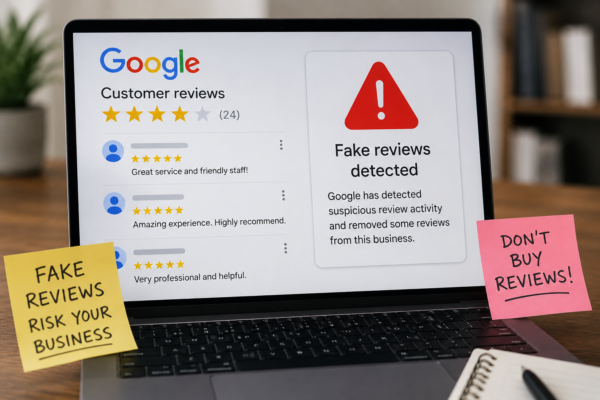
Google may apply restrictions when it detects suspicious review activity or believes its Fake Engagement policy has been violated. Depending on the situation, Google may temporarily prevent users from posting reviews, hide existing reviews, or display a warning informing visitors that suspicious reviews were removed.
Understanding the difference between a normal review delay and an actual profile restriction is the first step toward addressing the problem correctly.
How to Know Whether Google Restricted Your Reviews
Google does not always describe every detail behind its review-filtering decisions. Nevertheless, several warning signs can help you determine whether your Business Profile may be facing a review restriction.
1. The “Write a Review” Button Is Missing
Search for your business on Google using a device and account that are not connected to the business.
Normally, customers should see an option such as:
- “Write a review”
- “Rate and review”
- A star-rating section where they can submit feedback
When this option disappears for multiple users, Google may have temporarily disabled review posting on the profile.
Google confirms that when suspicious review activity is detected, users may be prevented from posting reviews or ratings for a period of time.
However, test the profile from several devices before reaching a conclusion. A missing button for one person could be caused by their Google account, application version, location, or another temporary technical issue.
2. Genuine Customers Say Their Reviews Were Published but Never Appeared
A customer may submit a review and see it while logged into their own Google account, but the review may not be visible publicly.
This usually means that Google’s moderation system filtered or delayed the review. Google states that reviews are commonly removed or withheld when they appear to violate policies involving spam, inappropriate content, or fake engagement.
One missing review does not necessarily indicate a business-wide restriction. The reviewer’s account or the wording of the review may have triggered an automated filter.
The situation becomes more concerning when:
- Several customers experience the same problem.
- No new reviews have appeared for weeks.
- Reviews from different customers and devices are affected.
- Customers can see their reviews privately, but nobody else can see them.
- Previously visible reviews begin disappearing at the same time.
These patterns may indicate that Google is applying additional scrutiny to reviews connected with the profile.
3. Google Displays a Warning on the Business Profile
One of the clearest indications of enforcement is a public warning displayed directly on the Business Profile.
Google may show a notice explaining that suspicious reviews were recently removed. According to Google’s Business Profile policies, these warnings are intended to inform consumers when fake-review activity has been detected.
A warning may appear alongside other restrictions, including:
- Temporary suspension of new reviews
- Removal of a group of existing ratings
- Hiding reviews for a specific period
- Additional monitoring of future review activity
If such a warning appears, take a screenshot immediately. Record the date, exact wording, profile URL, and any recent changes in the review count. This information may be useful when reviewing the situation or submitting an appeal.
4. You Receive an Email About a Review or Profile Restriction
Google may notify the profile owner by email before or after applying certain restrictions.
Check the inbox connected to the Business Profile, including spam and promotions folders. Search for messages containing terms such as:
- Business Profile restriction
- Fake engagement
- Suspicious review activity
- Policy violation
- Removed reviews
- Appeal your restriction
Google states that businesses affected by Fake Engagement enforcement may receive an email explaining the restriction and whether an appeal option is available.
Before clicking anything, verify that the message comes from an authentic Google domain. Business owners should be cautious of third parties sending false suspension notices or requesting payment to restore reviews.
5. A Large Number of Reviews Disappear Suddenly
It is normal for an individual review to be filtered occasionally. It is less normal for dozens of reviews to disappear within a short period.
A significant reduction in the review count may happen after:
- Google identifies a group of reviews as suspicious.
- The profile experiences a suspension or reinstatement.
- Duplicate Business Profiles are merged.
- Reviews are connected with accounts that violated Google policies.
- Google performs a broader review-quality enforcement action.
Google’s Fake Engagement policy prohibits reviews that are paid for, incentivized, posted from multiple accounts at one person’s request, or not based on a genuine experience.
A sudden loss of reviews does not prove that the business purchased or manipulated them. Legitimate reviews may occasionally be caught in automated enforcement. The business should still examine how reviews were collected and document which reviews disappeared.
6. New Reviews Stop Appearing After a Sudden Review Increase
A sudden increase in review activity can attract additional scrutiny, particularly when many reviews are posted within a limited period.
This may happen when a business:
- Launches a large email or SMS review campaign.
- Asks many employees, friends, or relatives to submit reviews.
- Uses the same device to create or access multiple reviewer accounts.
- Offers discounts, gifts, or services in exchange for reviews.
- Purchases reviews from a third party.
- Directs only satisfied customers to leave public feedback.
Google requires reviews to reflect genuine customer experiences. Offering compensation or incentives in exchange for reviews is prohibited, even when the customer actually used the business.
Businesses should pause any questionable review-acquisition activity as soon as a possible restriction is identified. Continuing the same pattern may create additional violations and make the situation more difficult to resolve.
A Simple Test Before Assuming Your Reviews Are Restricted
Before contacting Google, perform a basic review check:
- Search for the business on Google Search and Google Maps.
- Check whether the “Write a review” option is available.
- Test from at least two unrelated Google accounts.
- Compare the review count on Search and Maps.
- Ask affected customers whether their reviews remain visible in their own accounts.
- Check the Business Profile dashboard and email for policy notices.
- Record which reviews disappeared and when the issue began.
If the review button is available and only one or two reviews are missing, the issue is more likely related to individual review moderation.
If the button is unavailable, a warning is displayed, Google has sent a restriction notice, or nearly all new reviews are being rejected, the profile may be subject to broader enforcement.